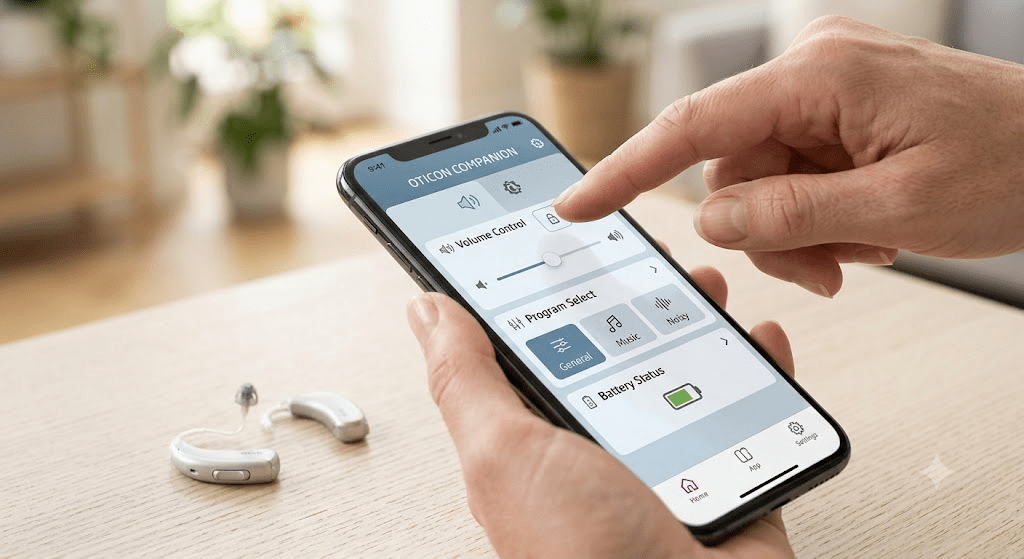
Are you using modern hearing aids to hear the world better? If so, the Oticon Companion App is a wonderful tool for you. It turns your smartphone into a smart remote control. You do not need to touch your tiny hearing devices directly. Instead, you can change settings right from your phone screen.
Using this app makes daily life much easier. Whether you are at home or in a noisy store, full control is in your hand. Let us explore how this clever app works. We will look at simple ways to set it up and use it every single day.
What is the Oticon Companion App?
The oticon companion app is a free mobile application made by Oticon. It connects your smartphone directly to your Bluetooth hearing aids. Think of it as a digital bridge between your ears and your phone. It works with both Apple iOS and Android devices.
You can download it safely from the Apple App Store or the Google Play Store. Once installed, it lets you manage your listening experience with a simple touch. It gives you the power to adjust sounds without anyone noticing. It is discreet, fast, and very helpful for daily use.
Supported Devices and Compatibility
Before you start, you must check if your phone and hearing devices work with the oticon companion app. Most modern Oticon hearing aids are fully compatible. This includes popular models like Oticon Real, Oticon Intent, and Oticon Zircon.
You also need a fairly modern smartphone. For Apple users, it runs smoothly on most iPhones running current iOS versions. For Android users, your phone should have Android OS 10 or later. You can always check the official Oticon compatibility guide online. This ensures your specific phone model will pair nicely with your hearing technology.
How to Download and Install the App
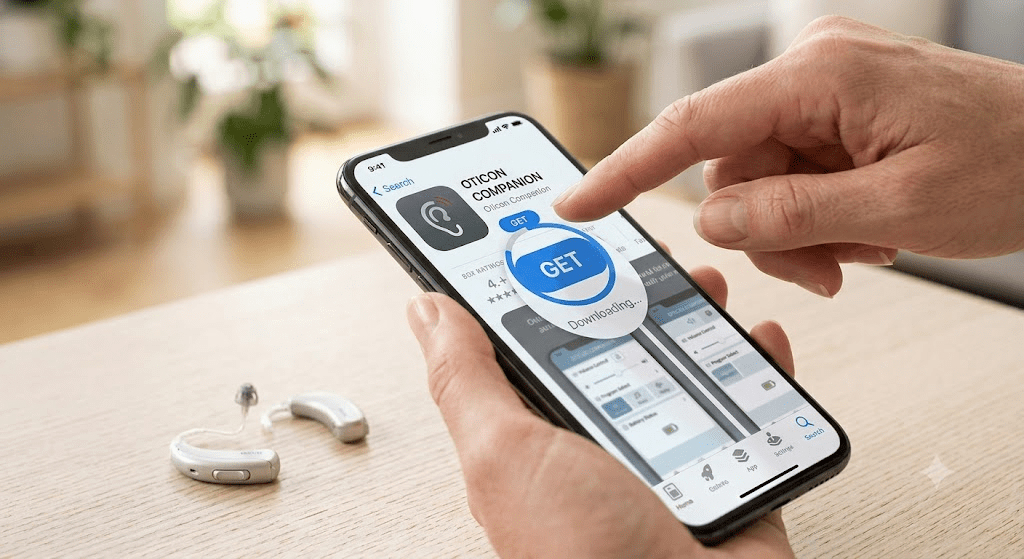
Getting the oticon companion app on your phone takes just a few minutes. First, open the App Store on your iPhone or the Google Play Store on your Android device. Type the name into the search bar and tap the search button.
Look for the official icon and tap the install or get button. You might need to enter your store password or use your fingerprint. Wait a moment for the download to finish. Once it installs, tap open to launch it. You are now ready to begin the simple setup process.
Step-by-Step Pairing Process
Pairing your hearing aids with the oticon companion app is a very simple task. First, turn on Bluetooth on your smartphone. Next, restart your hearing aids by turning them off and back on again. This puts them into pairing mode for a few minutes.
Open the app on your phone and follow the on-screen prompts. The app will search for your devices nearby. When it finds them, tap to connect. It might ask you to confirm the pairing request. Once connected, the app will remember your devices for future use.
Adjusting Volume and Mute Controls
One of the best features of the oticon companion app is volume control. You can easily change the loudness of your surroundings. The main screen shows simple volume sliders for your left and right ears. You can move them up to hear softer sounds or down if things get too loud.
There is also a handy mute button at the bottom of the screen. If someone starts a loud vacuum cleaner, just tap the mute icon. This silences the microphones instantly so you can relax. When the noise stops, just tap it again to unmute.
Switching Between Listening Programs
Your hearing care professional can set up special programs for different places. The oticon companion app lets you switch between these programs with a quick swipe. You might have one program for normal quiet days and another for loud restaurants.
Just tap the sound icon at the bottom of your phone screen. You will see program tiles that you can swipe through. Tap the tile that matches where you are right now. The hearing aids will adjust their settings automatically to give you the best sound quality.
Reducing Background Noise with SpeechBooster
Background noise can make conversations very tiring. Luckily, the oticon companion app includes a helpful feature called SpeechBooster. This tool is great for noisy social gatherings or busy coffee shops. It helps your ears focus on the person talking right in front of you.
When things get loud, simply tap the SpeechBooster icon in the app. It will turn on and reduce unwanted sounds coming from behind and the sides. It makes speech much clearer and easier to understand. You can turn it off just as easily when you return to a quiet room.
Using Your Phone as a Remote Microphone
Sometimes you might be in a large room where the speaker is far away. The oticon companion app offers a clever feature to solve this problem. It lets you use your smartphone as a remote microphone. You can place your phone close to the person speaking.
The phone will pick up their voice and stream it directly to your ears. This helps you hear them clearly even from across the room. It is a fantastic feature for classrooms, meetings, or family lectures. It turns your phone into a helpful assistive listening device.
Checking Battery Levels Daily
Running out of power during the day is never fun. The oticon companion app makes it easy to check your battery status. When you open the main screen, you will see clear battery indicators. They show exactly how much power is left in both the left and right devices.
If you use rechargeable models, you can see if they need a quick top-up. If you use disposable batteries, it warns you when they are getting weak. Checking this every morning helps you plan your day with confidence.
Locating Lost Hearing Aids
Losing a tiny hearing aid can be very stressful. Thankfully, the oticon companion app features a helpful finder tool. It uses location services to track the last known connection point. If you drop one nearby, the app can show you if you are getting warmer or colder.
You can walk around the room while looking at the signal strength on your screen. This map helps you retrace your steps and find your missing device quickly. Just make sure you keep location services turned on for the app to work at its best.
Remote Care and Professional Adjustments
Did you know you can get help without visiting the clinic? The oticon companion app supports remote care visits. You can meet with your hearing care professional through a live video call. They can fine-tune your settings while you sit comfortably in your own living room.
You do not need to drive to the office for small volume tweaks. Your provider sends the updates directly to your phone. You simply apply them to your devices. It saves time and keeps your hearing care very convenient.
Managing Wireless Accessories
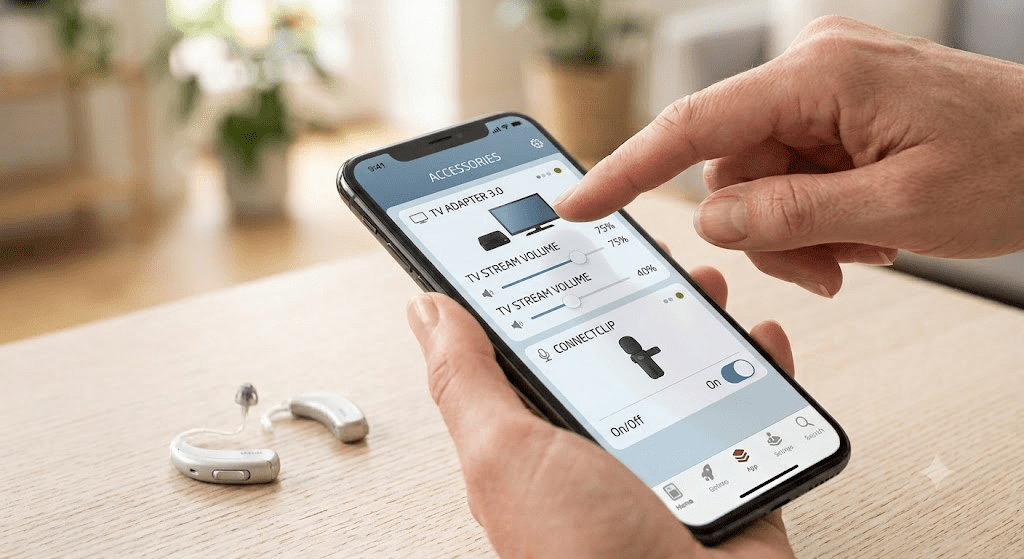
Many users enjoy pairing extra accessories with their hearing setup. The oticon companion app helps you manage tools like the TV adapter or ConnectClip. You can control how these devices stream sound directly to your ears.
If you are watching television, you can adjust the TV streamer volume separate from room sounds. This lets you enjoy your favorite shows at a level that is perfect for you. It puts total audio control right at your fingertips.
Troubleshooting Common Connection Issues
Sometimes technology acts up, and your app might lose connection. Do not worry, as troubleshooting connection issues is quite straightforward. First, try turning your phone Bluetooth off and back on again. If that does not work, restart your hearing devices.
You can also force close the oticon companion app and open it again. For stubborn problems, you can clear the Bluetooth cache in your phone settings. If issues continue, the app has a built-in help section with more tips to solve common queries.
Best Tips for a Great Experience
To get the best results, keep your phone close to your body. Large walls or distance can weaken the Bluetooth signal. Also, make sure your phone software and the app itself are always up to date. Developers release updates to make the connection much more stable.
Only pair your hearing aids with one phone or tablet at a time. Connecting to multiple devices can confuse the signal. Following these simple habits will lead to a smooth, worry-free listening experience every single day.
Conclusion
The oticon companion app is a powerful partner for your modern hearing technology. It gives you the freedom to adjust sounds, check power levels, and focus on conversations. Taking a few minutes to learn these features will truly improve your daily life.
Why not download or update the app today? Try testing out the volume slider or the SpeechBooster feature in a quiet room. If you have a great tip or a question about using the app, leave a comment below. We would love to hear your personal stories and help you on your hearing journey!
Frequently Asked Questions
Is the Oticon Companion App free to use?
Yes, the app is totally free to download and use. You can find it in both the Apple App Store and the Google Play Store without any hidden costs.
Can I use the app with older Oticon hearing aid models?
The app works with most modern devices. If your hearing aids are from 2016 to 2018, they might need a quick firmware update from your hearing care professional to connect properly.
Why does my app keep disconnecting from my hearing aids?
Disconnections can happen if your phone is too far away or if other Bluetooth devices are interfering. Try turning off extra Bluetooth gadgets and restarting both your phone and hearing aids.
Can I adjust the volume of each ear separately?
Yes, you can. The sound menu lets you adjust both sides together or move the sliders independently to suit your exact needs.
Do I need to keep location services on all the time?
You only need to keep location services turned on if you want to use the finder tool to locate lost devices.
How do I get help if the app is not working?
You can tap the more tab at the bottom of the app screen, then select help and support. There, you will find a troubleshooting guide to fix common problems.
Detailing Table
| Feature / Aspect | Details |
| Main Focus Keyword | oticon companion app |
| Primary Platform | iOS (Apple) and Android |
| Key Functions | Volume control, program switching, battery check, remote microphone |
| Noise Reduction Tool | SpeechBooster |
| Connectivity Type | Bluetooth |
| Target Audience | Oticon hearing aid users looking for easy phone control |
| Readability Level | 5th Grade (Simple, short sentences) |
| Primary Support Link | Official Oticon Support Website |
Leave a Reply